
Red light and red screens have a special status in the world of displays. Astronomers, photographers and even some productivity enthusiasts swear by red modes at night. At the same time, many users wonder whether red is actually good for their eyes or if it is just another internet myth.
This article explains when red light can be helpful, when it becomes impractical, and how it compares to other screen colours for eye comfort, night vision and sleep. It is designed to complement our main screen colors guide, where red screens are presented as a tool for testing and night work.
Table of Contents
Why red light is used to protect night vision
Humans have two main vision modes:
- Daytime vision (photopic), driven by cone cells, which handle colour and fine detail
- Night vision (scotopic), driven by rod cells, which are extremely sensitive in low light but do not see colours
Red light is used in astronomy, navigation and night photography because it affects night vision less than white or blue light. Rods are much less sensitive to deep red wavelengths, so a red light lets you see your surroundings or equipment without completely “resetting” your dark adaptation.
This is why:
- Astronomers often use red headlamps or red screens to check settings during observations
- Photographers use red to review camera controls during long exposures at night
- Some military and maritime environments use red lighting on bridges or control rooms after dark
With a red screen, you apply the same principle: compared to a bright white or cold blue display, a dim red background emits less disruptive light for night-adapted eyes. It allows you to interact with your device while preserving as much night vision as possible.
Is a red screen comfortable for long use?
Pros of a red screen
Using a red screen has several advantages in specific contexts:
- Very low blue component
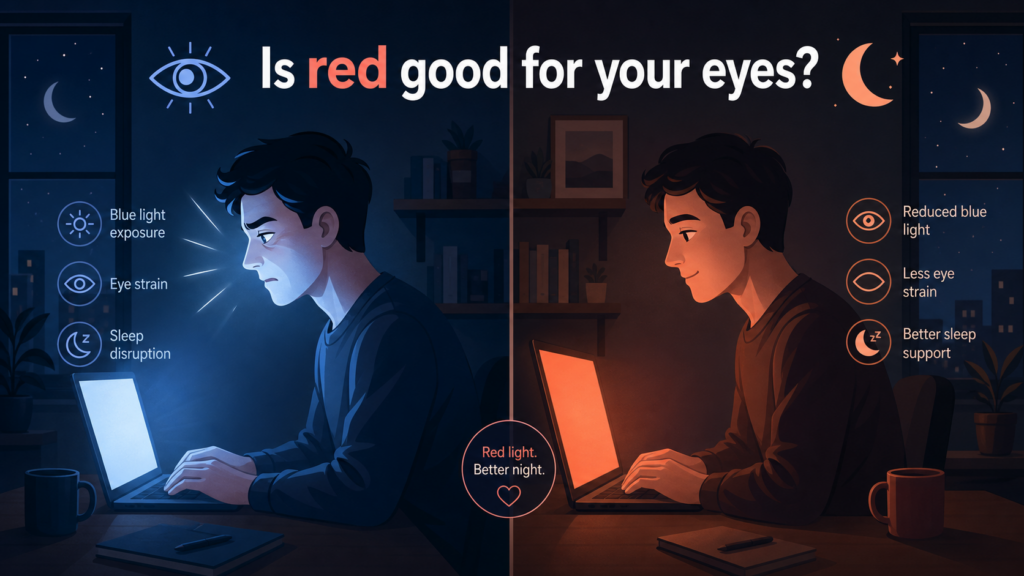
Blue light has a strong effect on your circadian rhythm and can make it harder to fall asleep when used close to bedtime. A pure red or very warm screen contains little to no blue, which means it is less likely to disturb your sleep compared to a cold white or blue screen. - Less perceived glare in dark rooms
When you are in a dark environment, a bright white screen can feel harsh and blinding. A dim red screen feels softer, and the lower brightness combined with the warm tone can reduce discomfort and glare. - Good for short, targeted tasks at night
If you need to quickly check a setting, read a short piece of information or control a device, a red screen lets you do that with minimal impact on both night vision and sleep.
Limits of a red screen
However, a red screen is far from ideal as a permanent background:
- Reading and UI legibility
Long text on a saturated red background is tiring. The strong colour and relatively low contrast with certain fonts can make reading more effortful than on a neutral or slightly warm background. - High saturation and visual fatigue
A full red background is visually intense. Over time, this intensity can itself become a source of fatigue, especially for work that requires concentration and precision. - Not practical for daytime work
In a bright environment, a red screen is impractical for general use. Colours are heavily biased, neutral content does not look natural, and any work requiring colour accuracy becomes impossible.
In practice, red screens are best treated as specialised tools rather than default themes: excellent at night for specific tasks, but not as a general-purpose, all-day solution.

Is red light better than blue light for your eyes?
Red and blue sit at opposite ends of the visible spectrum in terms of energy:
- Blue light
Shorter wavelength, higher energy, more likely to contribute to glare and to affect circadian rhythm. Late-evening exposure to strong blue light has been shown to suppress melatonin and delay sleep onset. - Red light
Longer wavelength, lower energy, less impact on circadian rhythm. It is often used in environments where preserving night vision and reducing sleep disruption are priorities.
From a sleep and circadian perspective, red (and more generally warm light) is less disruptive than blue in the evening. That is why many “night modes” and “blue light filters” shift the colour of the screen towards orange or red tones late in the day.
However, “better than blue” does not automatically mean “perfect for everything”:
- A very bright red screen can still be uncomfortable if the brightness is too high
- Poor ergonomics (distance, posture, lack of breaks) will cause fatigue regardless of colour
- For reading and daytime work, a slightly warm white or yellowish background tends to be more practical than pure red
So, yes, red is generally less disruptive for sleep than blue at night, but it is not a universal answer to all eye comfort issues.
Is red light safe for your eyes?
Everyday screen use
For normal screen use at reasonable brightness levels, red light is considered safe. The typical risks associated with digital screens (eye strain, dryness, headaches) are more related to:
- Prolonged near work without breaks
- Excessive brightness relative to ambient light
- Reduced blinking and poor ergonomics
Switching to a red or very warm screen may help reduce some discomfort at night by cutting blue light, but it does not remove the need for good habits: regular breaks, correct viewing distance, proper posture and adequate room lighting.
High-intensity red light
When people talk about light safety, they sometimes confuse ordinary screen-level red light with high-intensity sources:
- Red lasers
- High-power LED lamps
- Medical or cosmetic red light devices
These operate at completely different intensity levels compared to a standard monitor or phone. As with any bright source, staring at a very intense red light can be harmful, but that is not what happens with typical red screen usage.
For screens, the general rule is simple: if it feels uncomfortably bright, reduce brightness—regardless of colour.
When should you use a red screen?
Red screens make the most sense in specific scenarios:
- Preserving night vision
For astronomy, camping, navigation or any activity in very dark environments, a red screen lets you see essential information while maintaining your ability to see in the dark. - Late-evening device use
If you must use a screen close to bedtime, a red or very warm display (with reduced brightness) can be less disruptive for sleep than a bright, cold white screen. - Creating a low-light ambience
In a dark room, a dim red screen can provide a gentle ambient light that is less aggressive than white, useful for relaxing, listening to music or using a device minimally without lighting up the entire room.
On the other hand, red screens are not recommended as a default for:
- Long reading or coding sessions
- Daytime office work
- Tasks requiring colour accuracy or neutral backgrounds
For those, a light, slightly warm background (off-white, light beige) with good contrast and correct brightness is generally more comfortable and practical.
So, is red good for your eyes?
Red is not a magic “healthy” colour for your eyes, but it does have clear advantages in the right context.
- What red does well:
- Minimises blue light exposure, especially in the evening
- Helps preserve night vision in dark environments
- Reduces perceived glare compared to bright white screens in darkness
- Where red is limited:
- Not ideal for long reading or work sessions
- Too saturated and visually intense for everyday use
- Not a substitute for proper brightness, ergonomics and regular breaks
In practical terms:
- At night: a dim red or very warm screen can be a good choice if you want to reduce sleep disruption and preserve night vision.
- For long work or reading sessions: a slightly warm white or yellowish background, with moderate brightness and good contrast, is usually a better option.
So yes, red can be good for your eyes in certain scenarios, especially compared to bright blue-heavy screens at night. But the best overall comfort comes from a combination of sensible colours, controlled brightness and healthy screen habits.
How this relates to our screen colors guide
In our screen colors guide, we explain how red screens are used for:
- Testing the red sub-pixels of your display
- Preserving night vision during astrophotography or outdoor night work
- Creating specific ambient lighting effects
This article goes deeper into the question of whether red is good for your eyes in everyday use—especially in terms of night vision, sleep and long-term comfort.
If you want a broader view of how other colours like white, black, blue, yellow, orange and grey are used for testing, work, relaxation and photography, you can read the full screen colors guide and use it together with this article.
Sources: Lighting Ergonomics, Optometrists.org, Sleep Foundation